
Building a Button with a Loading Indicator Web Component
One of the things I sometimes deal with on my media repository is my NAS waking up. It means that sometimes actions taken like saving an item or updating progress take a little bit more time than normal. It's a minor annoyance, but I wanted something that could indicate to me that I did indeed click the button and the form is processing. To do this, I added a loading indicator to the button and turned it into a web component.
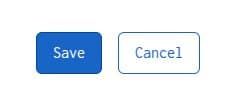
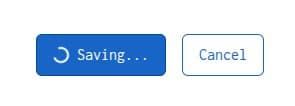
First up, let's build the HTML and CSS for the button.
<button type="button" class="btn-primary">
  <span class="loader"></span>
  <span class="button-text">Save</span>
</button>
We have a standard button with two <span /> elements in them. The .loader span will hold the spinning circle. the .button-text span holds the button's text. Adding some CSS, we'll make the button look nice and make sure the button is flex.
button {
  border-radius: 6px;
  border-width: 1px;
  border-style: solid;
  padding: 8px 16px;
  font-size: 1rem;
  cursor: pointer;
}

.btn-primary {
  background-color: oklch(52% 0.1686 257.29);
  border-color: oklch(41.76% 0.1496 257.29);
  color: oklch(100% 0 0);

  &:hover {
    background-color: oklch(41.76% 0.1496 257.29);
  }
}

button:has(.loader) {
  display: flex;
  align-items: center;
  column-gap: 8px;
}

loading-button[processing="true"] button .loader {
  display: inline-block;
}

button .loader {
  width: 1rem;
  height: 1rem;
  border: 2px solid oklch(100% 0 0);
  border-bottom-color: transparent;
  border-radius: 50%;
  display: inline-block;
  box-sizing: border-box;
  animation: rotation 1s linear infinite;
  display: none;
}

@keyframes rotation {
  0% {
    transform: rotate(0deg);
  }
  100% {
    transform: rotate(360deg);
  }
}
To ensure other buttons aren't affected, I use CSS :has to only put the display: flex on buttons that have the .loader class. I don't think it'd really negatively affect them, but it's an easy way to ensure this CSS change only affects the buttons with a spinning icon.
Now you'll notice there's no web component here. That's the next step. Let's call it LoadingButton with the HTML tag <loading-button />.
class LoadingButton extends HTMLElement {
  contstructor() {
    super();
  }
}

customElements.define('loading-button', LoadingButton);
The first thing we're going to want to do is set the attributes I want for it:
- Normal text (
text) - Text displayed while processing (
processing-text) - Flag if indicating it's processing (
processing)
class LoadingButton extends HTMLElement {
  static observedAttributes = ['processing', 'text', 'processing-text'];

  contstructor() {
    super();

    this['text'] = 'Submit';
    this['processing-text'] = 'Submitting...';
    this['processing'] = false;
  }
}

customElements.define('loading-button', LoadingButton);
Since we're using attributes, we're going to need to add the attributeChangedCallback() method.
class LoadingButton extends HTMLElement {
  static observedAttributes = ['processing', 'text', 'processing-text'];

  contstructor() {
    super();

    this['text'] = 'Submit';
    this['processing-text'] = 'Submitting...';
    this['processing'] = false;
  }

  attributeChangedCallback(property, oldValue, newValue) {

  }
}

customElements.define('loading-button', LoadingButton);
Now let's add the logic. I need to handle the three attributes. If I'm changing the text, I need to change the button text only if it's not currently spinning. If I'm changing the text displayed while it's spinning, I'll need to only update the displayed text if it is currently spinning. The processing attribute will need to change the text to the appropriate text, as well as toggle the button's disabled attribute. I'm opting to do this as the buttons I'll be using this component likely have click events that hit the database. I want to prevent clicking the button twice and performing whatever action twice.
class LoadingButton extends HTMLElement {
  static observedAttributes = ['processing', 'text', 'processing-text'];

  constructor() {
    super();

    this['text'] = 'Submit';
    this['processing-text'] = 'Submitting...';
    this['processing'] = false;
  }

  attributeChangedCallback(property, oldValue, newValue) {
    const button = this.querySelector('button');
    const buttonTextSpan = this.querySelector('button .button-text');

    if (buttonTextSpan) {
      switch (property) {
        case 'processing':
          if (newValue === 'true') {
            button.setAttribute('disabled', 'true');
            buttonTextSpan.textContent = this['processing-text'];
          } else {
            button.removeAttribute('disabled');
            buttonTextSpan.textContent = this['text'];
          }
          break;

        case 'text':
          if (this['processing'] === 'false') {
            buttonTextSpan.textContent = newValue
          }
          break;

        case 'processing-text':
          if (this['processing'] === 'true') {
            buttonTextSpan.textContent = newValue
          }
          break;
      }
    }

    switch (property) {
      case 'processing':
        // handle this separately to keep internal value a boolean
        this[property] = newValue === 'true';
        break;

      default:
        this[property] = newValue;
        break;
    }
  }
}

customElements.define('loading-button', LoadingButton);
So now let's look at the final HTML.
<loading-button
  class="save-button"
  processing="false"
  text="Save"
  processing-text="Saving...">
  <button type="button" class="btn-primary">
    <span class="loader"></span>
    <span class="button-text">Save</span>
  </button>
</loading-button>
We can add some extra JavaScript helper functions as well to help us quickly interact with it.
function setLoadingButtonText(className, text, processingText, isProcessing = false) {
  document.querySelector(`loading-button.${className}`)?.setAttribute('text', text);
  document.querySelector(`loading-button.${className}`)?.setAttribute('processing-text', processingText);
  document.querySelector(`loading-button.${className}`)?.setAttribute('processing', isProcessing.toString());

}

function setLoadingButtonProcessing(className, isProcessing) {
  document.querySelector(`loading-button.${className}`)?.setAttribute('processing', isProcessing.toString());
}

// change the text of the button
setLoadingButtonText('save-button', 'Update', 'Updating...');

// set whether we're spinning
setLoadingButtonProcessing('save-button', true);
This works, but I think we can do a little better.
NoteI improved this as I wrote this post. It's common for me (and I would suspect others as well) to find improvements as I write about these things.
The one thing I don't particularly like is how we have to include all that HTML inside the button element. Let's make this a little simpler. First let's adjust the HTML so that the button just contains the text as its content.
<loading-button
  class="save-button"
  processing="false"
  text="Save"
  processing-text="Saving...">
  <button type="button" class="btn-primary">Save</button>
</loading-button>
Now, let's adjust the web component code to build out that HTML
class LoadingButton extends HTMLElement {
  static observedAttributes = ['processing', 'text', 'processing-text'];

  constructor() {
    super();

    this['text'] = 'Submit';
    this['processing-text'] = 'Submitting...';
    this['processing'] = false;
  }

  attributeChangedCallback(property, oldValue, newValue) {
    const button = this.querySelector('button');
    const buttonTextSpan = this.querySelector('button .button-text');

    if (buttonTextSpan) {
      switch (property) {
        case 'processing':
          if (newValue === 'true') {
            button.setAttribute('disabled', 'true');
            buttonTextSpan.textContent = this['processing-text'];
          } else {
            button.removeAttribute('disabled');
            buttonTextSpan.textContent = this['text'];
          }
          break;

        case 'text':
          if (this['processing'] === 'false') {
            buttonTextSpan.textContent = newValue
          }
          break;

        case 'processing-text':
          if (this['processing'] === 'true') {
            buttonTextSpan.textContent = newValue
          }
          break;
      }
    }

    switch (property) {
      case 'processing':
        // handle this separately to keep internal value a boolean
        this['processing'] = newValue === 'true';
        break;

      default:
        this[property] = newValue;
        break;
    }
  }

  connectedCallback() {
    setTimeout(() => {
        const button = this.querySelector('button');

      const loaderSpan = document.createElement('span');
      loaderSpan.classList.add('loader');

      const buttonTextSpan = document.createElement('span');
      buttonTextSpan.classList.add('button-text');
      buttonTextSpan.textContent = this['processing']
        ? this['processing-text']
        : this['text'];

      button.removeChild(button.firstChild)
      button.appendChild(loaderSpan);
      button.appendChild(buttonTextSpan);
    });
  }
}

customElements.define('loading-button', LoadingButton);
I added the connectedCallback() method to the component. I'll use this to build the two <span /> elements we used to have to define manually. I'll create two span elements and use JavaScript to remove the content of the button and then add the two elements. The result is the same, but with less HTML you have to write when building the button. The one gotcha here is the setTimeout(() => { }). This is unfortunately necessary because the <button /> element isn't present right as it's called. Adding it to the setTimeout() call allows for the button to be found to build out its content.
There's also the added benefit that this you can still get this to work if for whatever reason the user blocks or can't get the component JavaScript to load. In the following example, the button is clicked, and we log to the console that the button was clicked. Even if the web component didn't load, this will still work, it just won't toggle the button spinner and text.
window.addEventListener('load', function () {
  document.querySelector('.btn-primary').addEventListener('click', function () {
    setLoadingButtonProcessing('save-button', true);

    console.log('The user clicked the button');

    setTimeout(() => {
      setLoadingButtonProcessing('save-button', false);
    }, 5000)
  });
});
A Working Demo
Here's the full thing. Just copy all of this into an HTML file and give it a go!
<!DOCTYPE html>
<html lang="en">
  <head>
    <meta charset="UTF-8" />
    <meta name="viewport" content="width=device-width, initial-scale=1.0" />
    <title>Loading Button Web Component</title>
    <style>
      html,
      body {
        background: oklch(100% 0 0);
        color: oklch(0.1015 0.0296 302);
        font-size: 100%;
        font-family: monospace;
        padding: 0;
        margin: 0;
      }

      .container {
        margin: 64px;
      }

      button {
        border-radius: 6px;
        border-width: 1px;
        border-style: solid;
        padding: 8px 16px;
        font-size: 1rem;
        cursor: pointer;
      }

      .btn-primary {
        background-color: oklch(52% 0.1686 257.29);
        border-color: oklch(41.76% 0.1496 257.29);
        color: oklch(100% 0 0);

        &:hover {
          background-color: oklch(41.76% 0.1496 257.29);
        }
      }

      button:has(.loader) {
        display: flex;
        align-items: center;
        column-gap: 8px;
      }

      loading-button[processing="true"] button .loader {
        display: inline-block;
      }

      button .loader {
        width: 1rem;
        height: 1rem;
        border: 2px solid oklch(100% 0 0);
        border-bottom-color: transparent;
        border-radius: 50%;
        display: inline-block;
        box-sizing: border-box;
        animation: rotation 1s linear infinite;
        display: none;
      }

      @keyframes rotation {
        0% {
          transform: rotate(0deg);
        }
        100% {
          transform: rotate(360deg);
        }
      }
    </style>

    <script>
      class LoadingButton extends HTMLElement {
        static observedAttributes = ['processing', 'text', 'processing-text'];

        constructor() {
          super();

          this['text'] = 'Submit';
          this['processing-text'] = 'Submitting...';
          this['processing'] = false;
        }

        attributeChangedCallback(property, oldValue, newValue) {
          const button = this.querySelector('button');
          const buttonTextSpan = this.querySelector('button .button-text');

          if (buttonTextSpan) {
            switch (property) {
              case 'processing':
                if (newValue === 'true') {
                  button.setAttribute('disabled', 'true');
                  buttonTextSpan.textContent = this['processing-text'];
                } else {
                  button.removeAttribute('disabled');
                  buttonTextSpan.textContent = this['text'];
                }
                break;

              case 'text':
                if (this['processing'] === 'false') {
                  buttonTextSpan.textContent = newValue
                }
                break;

              case 'processing-text':
                if (this['processing'] === 'true') {
                  buttonTextSpan.textContent = newValue
                }
                break;
            }
          }

          switch (property) {
            case 'processing':
              // handle this separately to keep internal value a boolean
              this['processing'] = newValue === 'true';
              break;

            default:
              this[property] = newValue;
              break;
          }
        }

        connectedCallback() {
          setTimeout(() => {
            const button = this.querySelector('button');

            const loaderSpan = document.createElement('span');
            loaderSpan.classList.add('loader');

            const buttonTextSpan = document.createElement('span');
            buttonTextSpan.classList.add('button-text');
            buttonTextSpan.textContent = this['processing']
              ? this['processing-text']
              : this['text'];

            button.removeChild(button.firstChild)
            button.appendChild(loaderSpan);
            button.appendChild(buttonTextSpan);
          });
        }
      }

      customElements.define('loading-button', LoadingButton);

      function setLoadingButtonText(className, text, processingText, isProcessing = false) {
        document.querySelector(`loading-button.${className}`)?.setAttribute('text', text);
        document.querySelector(`loading-button.${className}`)?.setAttribute('processing-text', processingText);
        document.querySelector(`loading-button.${className}`)?.setAttribute('processing', isProcessing.toString());

      }

      function setLoadingButtonProcessing(className, isProcessing) {
        document.querySelector(`loading-button.${className}`)?.setAttribute('processing', isProcessing.toString());
      }

      window.addEventListener('load', function () {
        document.querySelector('.btn-primary').addEventListener('click', function () {
          setLoadingButtonProcessing('save-button', true);

          console.log('The user clicked the button');

          setTimeout(() => {
            setLoadingButtonProcessing('save-button', false);
          }, 5000)
        });
      });
    </script>

  </head>
  <body>
    <div class="container">
      <loading-button
        class="save-button"
        processing="false"
        text="Save"
        processing-text="Saving..."
      >
        <button type="button" class="btn-primary">Save</button>
      </loading-button>
    </div>
  </body>
</html>